Kubernetes memory, explained
See what is really consuming Pod memory.
Kubernetes tells you memory is high. KubeMemLens separates the observed charge into application memory, file cache, shmem and residual signals so you can investigate why.
v1.0.2 available · Tested on AWS EKS · Linux and cgroup v2
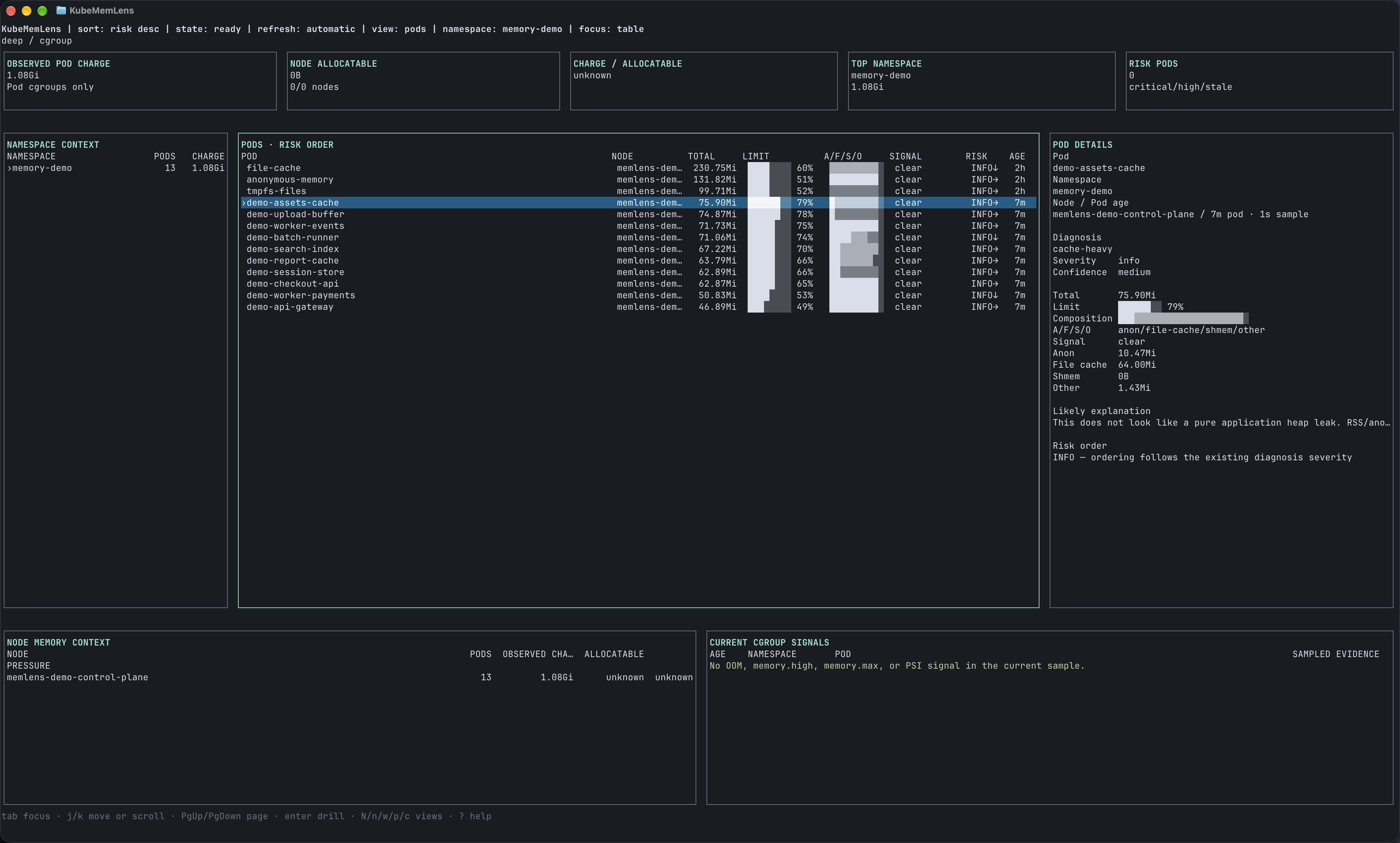 The main dashboardFull resolution
 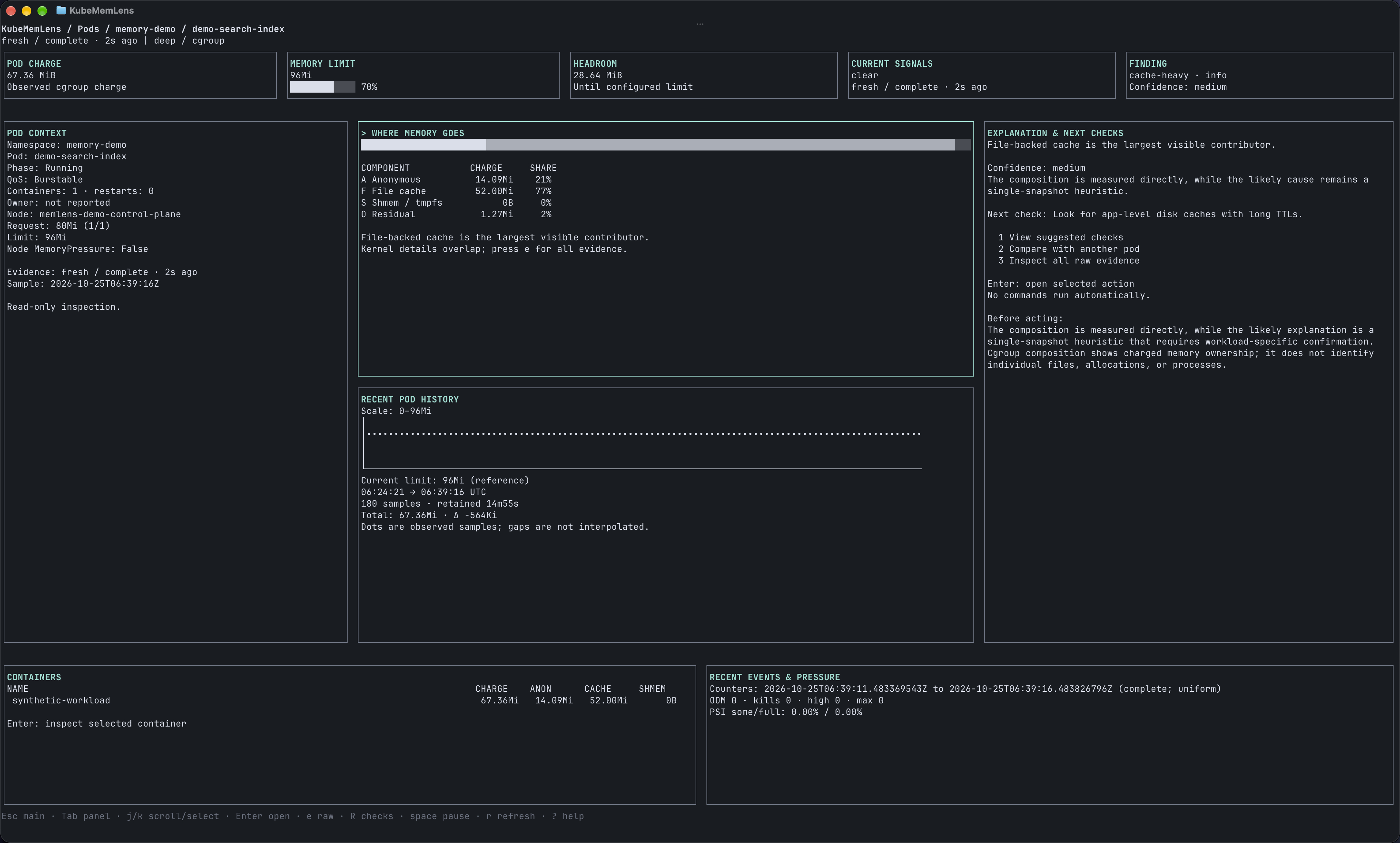 Inside a PodFull resolution
 Screenshots from the local demo. Open at full resolution to read the terminal text.
01 · Composition
A single memory number is not a diagnosis.
kubectl top can tell you that memory is high. It cannot tell you whether the charge comes from application memory, filesystem cache, tmpfs, pressure or another cgroup signal.
Repository sample · cache-heavy
- Anonymous memory
- 1.20 GiB
- File cache
- 2.51 GiB
- Shmem / tmpfs
- 90.00 MiB
- Residual / other
- 307.20 MiB
02 · Workflow
From signal to evidence.
Stay in the terminal and move through the investigation with read-only commands. KubeMemLens reports evidence and caveats; it does not mutate workloads.
Explore the CLI- 01
Find
kubectl memlens top pods -A --sort-by cacheBring the Pods with the strongest memory signals to the top.
- 02
Explain
kubectl memlens explain pod api-123 -n productionInspect composition, limits, pressure and the evidence behind the diagnosis.
- 03
Preserve
kubectl memlens capture -n production --pod api-123 --include-history -o incident.jsonWrite a redacted incident capture that you can review and compare.
In action
Similar totals.
Different memory.
Follow two Pods from the overview into their memory breakdown. Press Enter to inspect a Pod and Esc to return to your selection.
Read the demo walkthrough
The video has no audio. Its on-screen walkthrough shows:
- Select
demo-assets-cachein the main dashboard and press Enter. - Inspect its composition: 84% file cache and 14% anonymous memory.
- Move between panels with Tab and open suggested checks. These are hints; nothing runs automatically.
- Press Esc to return to the same selected Pod, then open
demo-upload-buffer. - Compare the similar totals: about 76 MiB and 75 MiB. The second Pod is 85% shared memory / tmpfs.
These are recorded examples from local synthetic workloads, not live cluster data.
03 · Evidence
Tested on AWS EKS.
Memory inspection, capture and replay, access isolation, recovery and cleanup were exercised on AWS EKS. Use KubeMemLens in your workflow and tell us what you find.
Exact supported and unsupported combinations are maintained in the compatibility contract.
Start here
Start investigating memory.
v1.0.2 adds a Pod dashboard with memory composition, context and history, plus a Go security update. Press Enter to inspect a Pod and Esc to return to your selection. Send feedback or report a bug on GitHub.
helm upgrade --install kube-memlens \
  oci://ghcr.io/danushkastanley/charts/kube-memlens \
  --version 1.0.2 \
  --namespace kube-memlens \
  --create-namespace \
  --set-string image.repository=ghcr.io/danushkastanley/kube-memlens \
  --set-string image.digest=sha256:d70146181fbc8a1d4c9220c78f3bf28bc9604919ef6ba5e1aaab699e055cecc5